
Introduction
The internet has become part of almost every area of modern life. We use online accounts for communication, shopping, banking, education, entertainment, work, and storing important information.
At the same time, cyber threats continue to evolve. A compromised password, a fake email, a malicious download, or an outdated device can create unnecessary security risks.
The good news is that improving your digital security does not always require advanced technical knowledge.
Simple and consistent cybersecurity habits can make a significant difference.
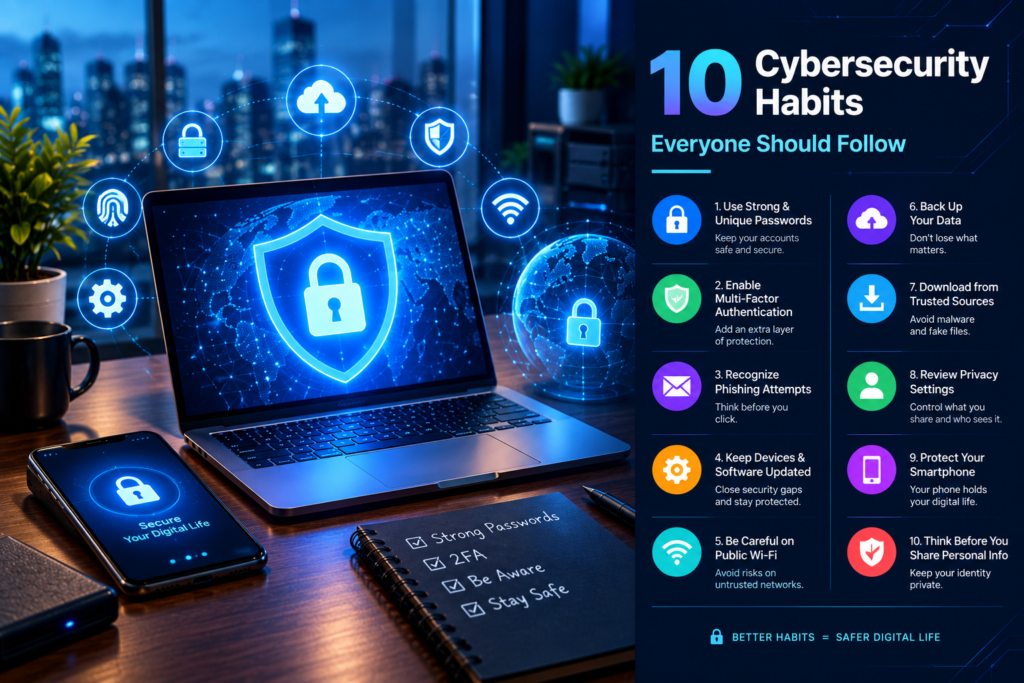
In this guide, we’ll explore 10 practical habits that everyone can adopt to improve their online security.
1. Use Strong and Unique Passwords
One of the most basic cybersecurity habits is using strong passwords.
A password should be difficult for someone else to guess, and you should avoid using the same password across multiple important accounts.
For example, if one website experiences a security breach and your password is reused elsewhere, attackers may attempt to use the same credentials on your other accounts.
Better Password Practices
- Use long passwords or passphrases.
- Give important accounts unique passwords.
- Avoid easily guessed personal information.
- Don’t reuse passwords across critical services.
- Consider using a reputable password manager.
A password manager can help create and store unique passwords without requiring you to memorize every one.
2. Turn On Multi-Factor Authentication
Passwords are useful, but they should not always be your only layer of protection.
Multi-factor authentication (MFA) adds another verification step when you sign in.
Depending on the service, this could involve an authentication app, security key, or another verification method.
Even if someone obtains your password, an additional authentication factor can make unauthorized access more difficult.
Where Should You Use MFA?
Prioritize accounts containing sensitive information, such as:
- Financial services
- Cloud storage
- Social media
- Business accounts
- Website administration
- Password managers
Your main email account deserves particular attention because it may be connected to password-reset options for many other services.
3. Learn to Recognize Phishing
Phishing is a common method used to trick people into revealing information or interacting with malicious content.
A message may appear to come from a company, colleague, delivery service, financial institution, or another trusted source.
It might create a sense of urgency by claiming that your account will be closed, a payment failed, or immediate action is required.
Warning Signs
Look carefully for:
- Unexpected messages
- Suspicious links
- Unusual requests for personal information
- Pressure to act immediately
- Unexpected attachments
- Slightly altered website addresses
- Requests for passwords or security codes
Before clicking a link in an unexpected message, consider opening the organization’s official website directly instead.
When something feels unusually urgent, take a moment to verify it.
4. Keep Your Devices and Software Updated
Software updates are not only about adding new features.
Updates can also address security weaknesses discovered in operating systems, applications, browsers, and other software.
Delaying updates for long periods can leave known vulnerabilities unaddressed.
Keep These Updated
- Operating system
- Web browser
- Mobile applications
- Desktop applications
- Security software
- Router firmware
- Website plugins and themes
Whenever practical, enable automatic updates for software that supports them.
For websites, outdated plugins and themes can be especially important to monitor because they may introduce security problems.
5. Be Careful With Public Wi-Fi
Public Wi-Fi can be convenient in airports, hotels, cafés, libraries, and other locations.
However, you should avoid assuming that every public network is trustworthy.
When using an unfamiliar network, avoid unnecessary sensitive activity and make sure websites and applications use secure connections.
For particularly sensitive work, consider using a trusted cellular connection or another secure connection method.
A Few Simple Rules
- Verify the network name before connecting.
- Avoid automatically connecting to unknown networks.
- Don’t ignore browser security warnings.
- Log out of sensitive services when finished.
- Keep your device’s security settings enabled.
Convenience should not come at the expense of basic security.
6. Back Up Important Data
Cybersecurity is not only about preventing unauthorized access.
It is also about being prepared if something goes wrong.
A hardware failure, accidental deletion, malware incident, or other problem could result in the loss of important files.
Regular backups can help reduce the impact.
Consider Backing Up
- Personal photographs
- Important documents
- Business files
- Website data
- Project files
- Financial records
- Important device data
For especially valuable information, consider maintaining backups in more than one location.
A backup is most useful when you can actually restore the data when needed, so periodically check that your backup process works.
7. Download Software From Trusted Sources
Installing unknown software can introduce unnecessary security risks.
Avoid downloading applications simply because an unfamiliar website claims they are free, faster, or “premium unlocked.”
Whenever possible, obtain software from the developer’s official website or a trusted app marketplace.
Be particularly cautious with:
- Pirated software
- Cracked applications
- Unknown browser extensions
- Unverified plugins
- Suspicious email attachments
- Unexpected executable files
If you don’t recognize a program or understand why it needs access to your device, investigate before installing it.
8. Review Your Account Privacy and Security Settings
Many online services provide security and privacy settings that users rarely check.
Take some time to review the accounts you use regularly.
Look for options related to:
- Login notifications
- Active sessions
- Connected devices
- Third-party applications
- Recovery methods
- Privacy settings
- Location sharing
- Account permissions
If you see a device or login location you don’t recognize, investigate it immediately.
You should also remove old applications and services that no longer need access to your accounts.
9. Protect Your Smartphone
Smartphones contain a huge amount of personal information.
They may provide access to email, banking, social media, photographs, documents, contacts, and authentication applications.
Treat your phone like a personal computer rather than simply a communication device.
Smartphone Security Checklist
- Use a strong screen lock.
- Keep the operating system updated.
- Install applications from trusted sources.
- Review app permissions.
- Remove apps you no longer use.
- Enable device-finding features.
- Avoid sharing sensitive information unnecessarily.
- Keep important data backed up.
If your phone is lost or stolen, security features such as a strong screen lock and remote device-management options can help protect your information.
10. Think Before You Share Personal Information
One of the most overlooked cybersecurity habits is controlling how much information you share online.
Information such as your full name, location, workplace, birthday, family details, or travel plans can sometimes be combined with other publicly available information.
This doesn’t mean you need to disappear from the internet.
Instead, think carefully about what information is necessary to share and who can access it.
Before Posting, Ask Yourself
- Does this contain sensitive information?
- Do strangers need to know this?
- Could someone use this information to impersonate me?
- Does the post reveal my current location?
- Is this information necessary?
A little caution can reduce unnecessary exposure.
Bonus: Check Your Accounts Regularly
Cybersecurity is not something you set up once and forget.
Make security reviews part of your routine.
Every few months, consider checking:
- Your important account passwords
- MFA settings
- Recent login activity
- Connected applications
- Device list
- Recovery email addresses
- Backup status
- Privacy settings
- Software updates
This doesn’t have to take hours.
A short security check can help you discover problems before they become bigger issues.
What Should You Do If You Think Your Account Was Hacked?
If you notice suspicious activity, don’t ignore it.
Start by securing the affected account.
Step 1: Change the Password
Change the password using a trusted device and create a new password that you haven’t used elsewhere.
Step 2: Enable MFA
If multi-factor authentication isn’t already enabled, turn it on.
Step 3: Check Active Sessions
Look for unfamiliar devices or login sessions and sign them out where appropriate.
Step 4: Review Account Changes
Check whether recovery information, email addresses, payment details, or other important settings were changed.
Step 5: Secure Related Accounts
If you reused the compromised password on other accounts, change those passwords as well.
Step 6: Watch for Further Suspicious Activity
Continue monitoring the account and related services for unusual activity.
If financial information may have been exposed, contact the relevant financial institution using its official contact information.
Cybersecurity Is About Habits, Not Just Software
Security software can be useful, but technology alone cannot protect you from every threat.
A person can have excellent security tools installed and still accidentally give their password to a scammer.
That is why cybersecurity should be treated as a combination of:
Technology + Awareness + Good Habits
Strong passwords, MFA, software updates, careful browsing, backups, and phishing awareness all work together.
A Simple Cybersecurity Checklist
Save this checklist and review it regularly:
- Use unique passwords for important accounts.
- Use a reputable password manager if helpful.
- Enable multi-factor authentication.
- Be cautious with unexpected emails and messages.
- Check links before opening them.
- Keep software updated.
- Back up important files.
- Download software from trusted sources.
- Review account activity and connected devices.
- Protect your smartphone.
- Review privacy settings.
- Think before sharing sensitive information.
Frequently Asked Questions
What is the most important cybersecurity habit?
There isn’t one habit that protects against every threat. Using unique passwords, enabling MFA, recognizing phishing attempts, keeping software updated, and maintaining backups are all important layers of protection.
How often should I change my passwords?
Rather than changing every password on a fixed schedule without reason, focus on using unique passwords and changing a password promptly when you suspect it has been exposed or compromised.
Is multi-factor authentication really necessary?
MFA provides an additional layer of account protection beyond a password and is especially valuable for important accounts.
Is public Wi-Fi safe?
Public Wi-Fi varies. Treat unfamiliar networks cautiously, avoid ignoring security warnings, and use secure connections for sensitive activities.
Can antivirus software protect me from everything?
No. Security software can help detect and block certain threats, but it cannot replace cautious online behavior.
Should I back up my smartphone?
Yes. Important photographs, documents, contacts, and other valuable information can be difficult or impossible to recover after device loss or failure.
How can I recognize a phishing message?
Look for unexpected requests, urgency, suspicious links, unusual attachments, and requests for passwords or security codes. Verify the message through an official channel when in doubt.
Conclusion
Good cybersecurity doesn’t require you to be a security expert.
Small habits can make your digital life considerably more organized and secure. Use strong and unique passwords, enable multi-factor authentication, keep your software updated, recognize suspicious messages, maintain backups, and regularly review your account settings.
Most importantly, stay skeptical when something online asks for sensitive information or demands immediate action.
As our digital lives continue to grow, cybersecurity habits are becoming everyday digital skills rather than optional technical knowledge.
Follow Future Stack for more practical guides on technology, AI, cybersecurity, and digital skills.